Designed templates for user persona, card sorting, priority features, journey mapping, etc. to help the team gather requirements and define user personas.
Delegated tasks to the team members and provided guidance on how to complete them.
Resolved any conflicts that may have arisen between team members.
Facilitated brainstorming sessions to generate ideas for new features and improvements.
Led sketching sessions to help the team visualize their ideas.
Prototyped the team’s ideas to get feedback from users.
Created wireframes to illustrate the basic structure of the designs.
Created prototypes to allow users to interact with the designs.
Created user flows to illustrate the flow of users through the designs.
Recruited users to participate in usability testing sessions.
Recruited users to participate in usability testing sessions.
Led usability testing sessions to get feedback from users on the designs.
Analyzed the feedback from usability testing sessions to improve the designs.
Created a project plan to track the progress of the team.
Collected feedback from stakeholders to ensure that the designs were meeting their needs.
Created presentation materials to communicate design decisions to stakeholders.
Held meetings with stakeholders to discuss design decisions.
Answered questions from stakeholders about design decisions.
Researchs
Interaction Design
Workshop Design
Visual Design & Branding
Prototyping
Understanding the Client
An American Multinational IT Enterprise, World’s Largest Financial service-led model global asset economics company that helps its customers to better acquire, plan and consume technology assets and adapt the financial models needed to drive digital transformation.whether you are a large corporation, an SME, or a public-sector client.
Key Areas of Operation
Asset Lifecycle Management
Technology Financing
Digital Transformation
The key drivers of Company services are
Agility
Innovation
End-to-end personalized service package
Global business process
Technical and business expertise
Client’s Expectations
To Understand their current landscape and help them adapt to a constantly evolving financial services landscape and improve its existing services and solutions by revamping its customer experience.
Proposed Solution
A Power App which re-positioned customer as a Global IT asset economics company by redesigning future journey considering current market, competitors and global trends.
Our Approach
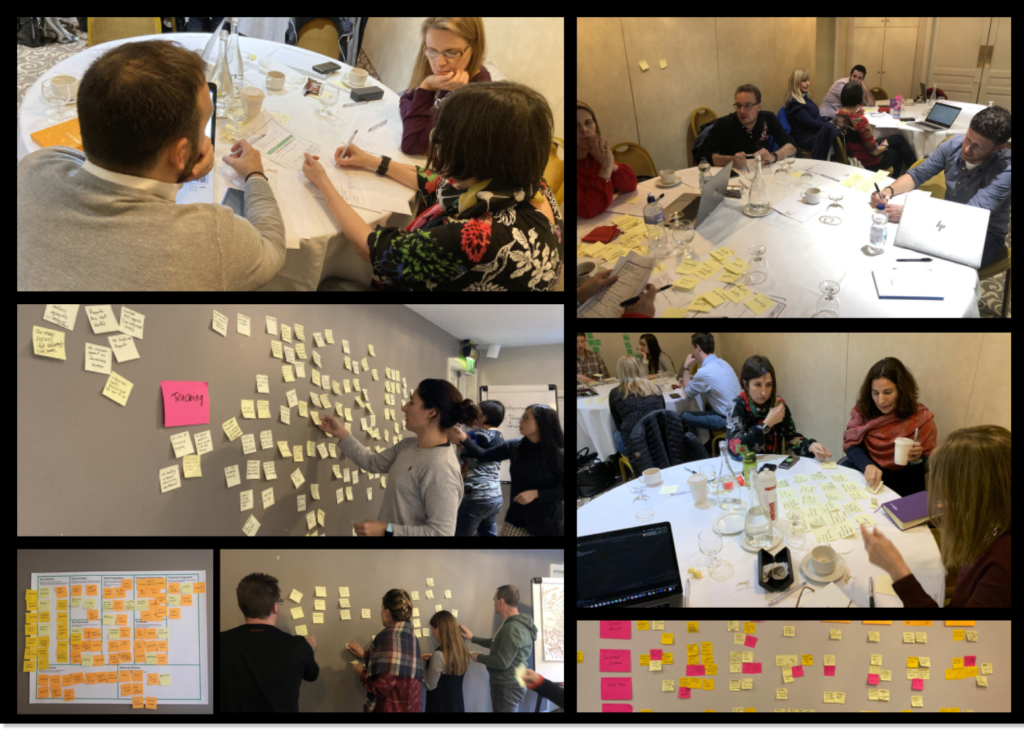
We conducted Design Thinking workshops. This workshop was conducted as a collaborative exercise between Infosys and Stakeholders to better understand and gather insights about internal processes and identify design opportunities through a disciplined innovative process and uncover unmet needs.
The Discovery/Design Thinking Workshop was conducted by Infosys in Leixlip, Ireland between 11 Nov 2019 and 22 Nov 2019. Selective Client’s employees from around the world with expertise in each domain were in attendance. Similarly, we conducted 2 more workshops with same client till May 2020.
Strategy
Stakeholder Discussion Define/Discuss Project Vision and Goal Brand Strategy Measure of Success
Discovery
Business Requirement Analytics Review Content Audit User Interviews and Surveys
Analysis
User Case Persona Generation Storyboarding Experience Map Workflow Diagram
Design
Site Map Sketching Wireframes Prototyping
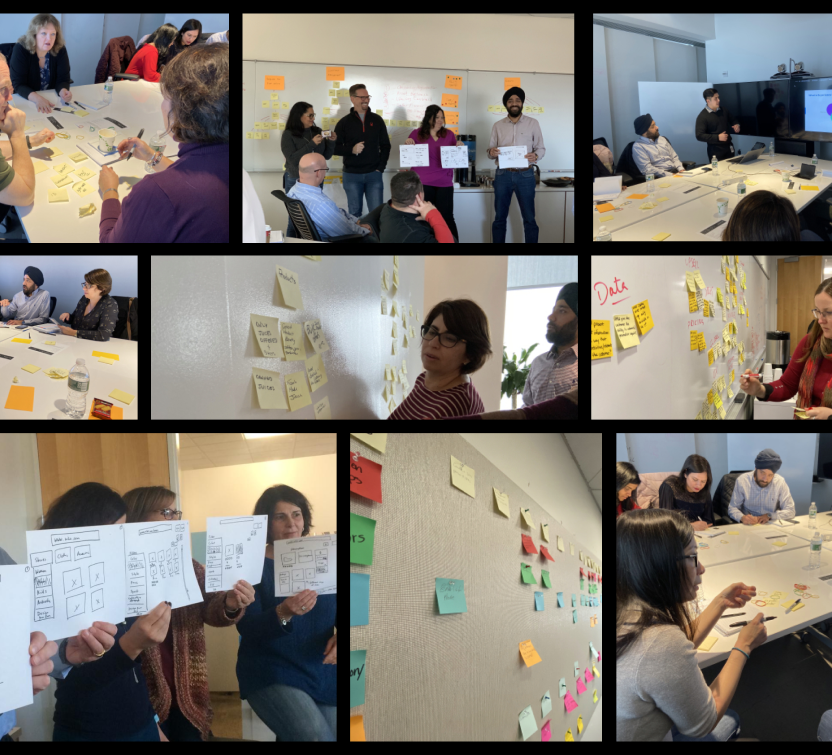
This photo was captured in the first workshop with clients
Which methods did we follow?
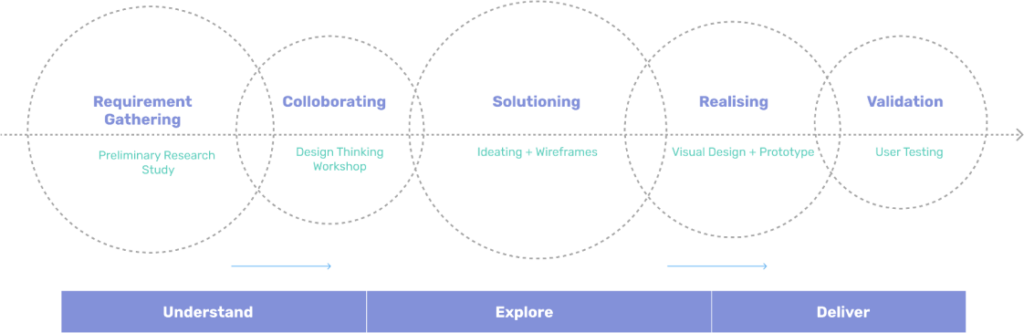
Design thinking workshop is a human-centered approach to problem-solving that uses a series of iterative steps to understand the problem, generate ideas, and create solutions. In a design thinking workshop, we followed these steps
Requirement Gathering
Preliminary Research Study
We identified the stakeholders. This included users, customers, employees, and other people who would be affected by the project.
We understood the needs of the stakeholders. We did this through interviews, surveys, and observations. We wanted to get a clear understanding of what the stakeholders wanted and needed from the project.
We conducted primary research. This is research that is conducted directly with the stakeholders. We used interviews, surveys, and observations to get a deep understanding of the stakeholders’ needs and motivations.
We analyzed the data. We looked for patterns and trends in the data. We wanted to identify the key insights that would help us to inform the design of the project.
We created a requirements document. This document summarized the key insights from the analysis and identified the requirements for the project. The requirements document would guide the design and development of the project.
Requirement Gathering
Preliminary Research Study
Collaborating
Design Thinking Workshop
Collaborating
Design Thinking Workshop
We identified the stakeholders early on. This included users, customers, employees, and other people who would be affected by the project.
We understood the stakeholders’ needs and goals. We did this through interviews, surveys, and observations. We wanted to get a clear understanding of what the stakeholders wanted and needed from the project.
We involved the stakeholders in the workshop. The workshop was a collaborative process, with the stakeholders actively participating. This helped to ensure that the workshop was relevant to the stakeholders’ needs and that the solutions that were generated were feasible.
We used visual tools. Visual tools were helpful in communicating ideas and facilitating discussion during the workshop. This could include whiteboards, sticky notes, and prototypes.
We were open to feedback. The workshop was a forum for feedback and discussion. The stakeholders were encouraged to share their ideas and concerns. This helped to ensure that the final solution was one that met the needs of all stakeholders.
Solutioning
Ideation + Wireframes
We started with ideation. We generated as many ideas as possible for solutions to the problem. This was done through brainstorming, sketching, and prototyping.
We prioritized the ideas. Once we had a number of ideas, we prioritized them based on feasibility, viability, and desirability.
We created wireframes of the top-priority ideas. Wireframes are low-fidelity prototypes that can be used to communicate the ideas to stakeholders and get feedback.
We iterated on the wireframes. Once the wireframes were created, we iterated on them based on feedback from stakeholders. This process of iteration helped to refine the solutions and ensure that they met the needs of the stakeholders.
Solutioning
Ideation + Wireframes
Realising
Visual Design + Prototype
Realising
Visual Design + Prototype
We started with visual design. We created visual designs of the solutions using tool , Figma.
We created prototypes. Once the visual designs were created, we turned them into prototypes. Prototypes are interactive representations of the solutions that can be used to test the usability and feasibility of the solutions.
We got feedback from stakeholders. Once the prototypes were created, we shared them with stakeholders to get feedback. This feedback was used to refine the solutions and ensure that they met the needs of the stakeholders.
We iterated on the designs and prototypes. The process of visual design and prototyping is iterative. This means that the designs and prototypes can be refined and improved based on feedback from stakeholders.
Validation
User Testing
We identified the right users. We recruited users who were representative of the target audience and who had the experience to provide meaningful feedback.
We created a user testing plan. The plan included the goals of the testing, the methods that would be used, and the metrics that would be used to measure success.
We ran the user tests. This involved recruiting users, conducting the tests, and analyzing the data.
We got feedback from stakeholders. This feedback was used to refine the solutions and ensure that they met the needs of the users and stakeholders.
Validation
User Testing
How was the workshop Divided ?
Build Understanding – Understanding the market trend and offering Know Context – Understand and evaluate the domain and process. Know People – Understand the customer needs and wants. Frame Insight – Structure the analysis derived from the workshop
Chapter 02
Workshop Output
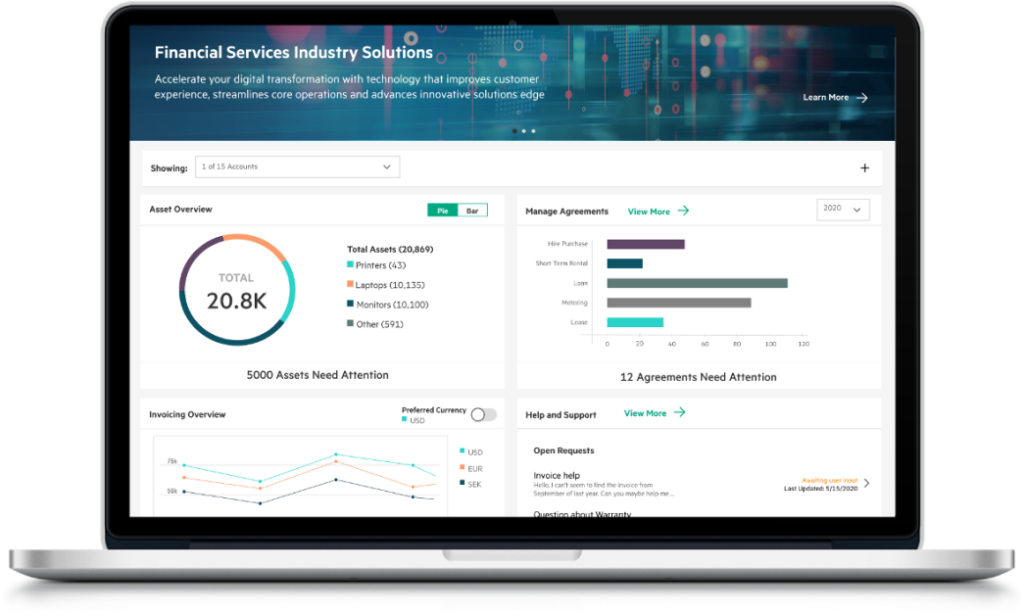
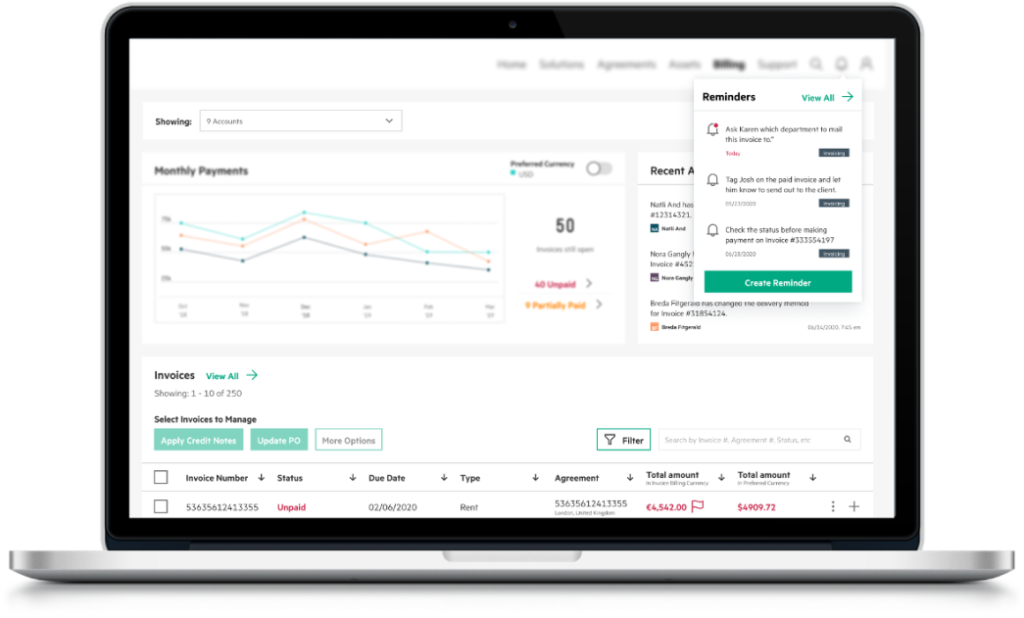
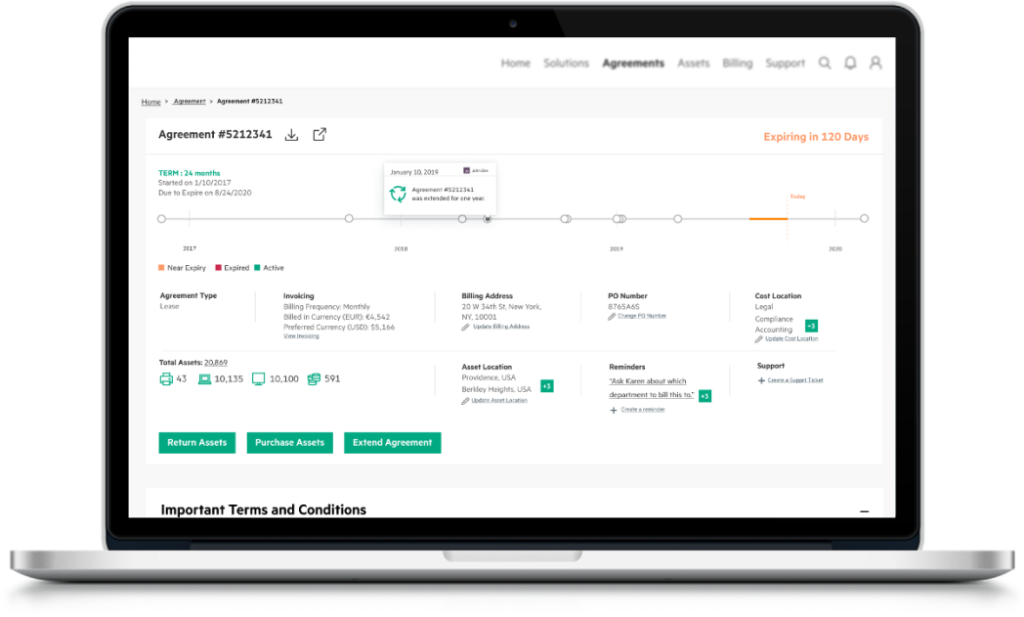
These are some sample screens
The Dashboard of the portal which has space for displaying upcoming features or promote cross-selling of various services. It provides an overview of everything happening in the portal without having to dig in too deep
Key Differentiators
Data visualization
Recent activity and reminders
The ability to collaborate with others on invoices
The ability to integrate with other financial software
The ability to export data to other formats
A space to manage invoices with a data visualisations where the users can see historic transaction trends and also see upcoming expenses for future monetary prediction & management All activities related to invoice management can be taken from here to make this a one-stop place Features like recent activity & reminders help keep the user aware & informed
Key Differentiators
The ability to import and export invoices from different sources.
The ability to collaborate with others on invoices.
The ability to track payments and expenses.
The ability to generate reports.
The space to manage the customers’ engagement with Financial Service enterprise where the users can see their agreements in a timeline view and also zoom in & dig deeper into a particular year to understand the details of that milestone This section also provides an at-a0glance overview of all the details associated with the agreement and quick CTA
Key Differentiators
Timeline view
At-a-glance overview
Quick CTA
The ability to track customer interactions.
The ability to generate reports.
The ability to collaborate with others.
This photo was captured in Second workshop with clients
The Infosys team was incredibly collaborative and worked closely with us to ensure that the final design met our needs. They were also very responsive to our feedback and made sure to incorporate our suggestions into the design. We were very happy with the end result.
We were very impressed with the work of the Infosys onsite and offshore team. They were able to quickly understand our needs and deliver a design that was both user-friendly and effective. We would definitely recommend Infosys to anyone looking for a top-notch design team
The Infosys team was able to take our complex requirements and turn them into a simple and easy-to-use portal. The design is both visually appealing and functional, and we have received positive feedback from our users. We would definitely work with Infosys again on future projects
What were the challenges?
We have found that it is important to take the time to explain the design thinking process to clients before we begin the workshop. This helps them to understand what to expect and how they can participate. as they were not be familiar with the design thinking process. The clients may not be comfortable with the creative process. We have found that it is important to create a safe and supportive environment for clients to participate in the creative process. This means being patient and understanding, and encouraging them to share their ideas even if they are not sure if they are good or not. The clients may not be able to visualize solutions. We have found that it is helpful to use visual aids to help clients visualize solutions. This could include using whiteboards, sticky notes, or even props. We also faced the following challenges when conducting workshops online with clients Communication challenges: It can be difficult to communicate effectively with clients online, especially if they are not familiar with the technology. We have found that it is important to use simple language and to be clear about our instructions. Time zone differences: If the offshore team is located in a Indian time zone, it can be difficult to find a time that works for everyone. We have found that it is important to be flexible and to work with the clients to find a time that works for everyone. Technical problems: There is always the possibility of technical problems, such as poor internet connection or software glitches. We have found that it is important to be prepared for these problems and to have a backup plan.